Showing posts with label Apple. Show all posts

Friday, 6 February 2015

The 9 most sought-after tablets of 2014

This holiday season will see the sales of tablets soaring as most families are expected to buy the gadget as a gift.


Amazon Fire HD: The perfect budget device for those that want to browse and consume rather than get overly creative or productive. Amazon’s tablets are getting better every year and, at $99, even though you’ll be locked into Amazon’s smaller ecosystem of apps and services and the fact that the screen is just 6 high definition inches in size, the Fire HD 6 is hard to beat in terms of price and performance. 


The Nexus 9: This is the best Nexus tablet ever built which means it’s also one of the best Android tablets ever created. Its squarer screen makes it better than past devices for multitasking and for doing things other than watching films and the build quality and attention to detail are also a serious step up. It’s also incredibly fast thanks to a phenomenal processor. The only criticism is that there’s no SD card expansion slot.


New Lenovo YOGA Tablet 2 Pro: Developed with help from US actor Ashton Kutcher, the Lenovo is as focused on entertainment as much as working on the fly. It actually has a 'hang’ setting which means the device can be fixed to a wall like a small TV so that everyone can see the 1-inch QHD screen. What’s more it also has an integrated projector for creating a mini cinema. It’s also the world’s first tablet with an integrated subwoofer for better sound.


The Microsoft Surface Pro 3: It’s third time lucky for the Surface Pro. The latest version comes the closest yet to really combining all of the best elements of a notebook with those of a tablet. It’s phenomenally well made and can run desktop applications. The pen input brings an extra dimension to design and graphics work. But that flexibility comes at a premium – the entry-level model is over $700 and comes with some limitations, it can only run Windows apps


Samsung Galaxy Note Pro 12.2: Like the Surface Pro 3, this huge 12-inch plus Samsung tablet takes productivity to another level thanks to all of that screen space. However, it’s an Android tablet so has access to pretty much every app out there as well as Samsung’s own growing ecosystem of apps and services. The only problem is build quality, it’s a bit plastic.


Samsung Galaxy Tab S 10.5: This device, available with an 8.4-inch or 10.5-inch screen, has one of the best displays found on any tablet made by any company and under that AMOLED screen everything else is equally high-specification. So much so that if it weren’t for the lack of attention to design and choice of construction materials, it really would give the iPad Air a run for its money.


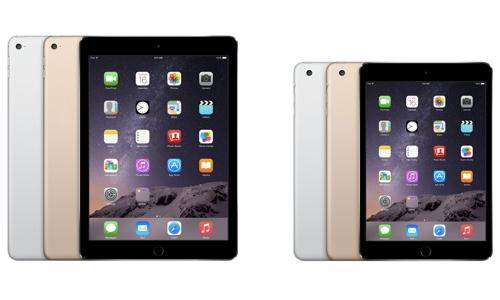
The iPad Air 2: The original iPad Air, launched last year, was hands down the best full-sized tablet money could buy and the new model extends the gap between it and everything else even further. It has a reflective coating on its screen to make it easier to use outdoors and it also gets a biometric fingerprint sensor for extra security and for making online payments. And at 437g it is also one of the lightest and (6.1mm) thinnest tablets on the market as well as being ultra powerful

Sony Xperia Z2 Tablet: The only tablet here that’s waterproof, it is probably the best Android tablet that Sony has ever built. Despite a 10.1-inch screen and a pretty large bezel, it only weighs 426g. The company has paid as much attention to how it looks as to how it performs and so it feels like a quality product and one worth the price tag even if the display isn’t quite as impressive as those on Samsung or Apple tablets.


iPad Mini 3: Like its bigger brother, the iPad Mini is in a class of its own. If you are looking for a premium quality tablet where the only compromise is on size then there really isn’t anything on the market that can compete. It has a 64-bit processor, a great 7.9-inch Retina display and an integrated fingerprint scanner for extra security and online payments.

Sunday, 18 January 2015

How to Set Up Your Sweet New iPad

How to Set Up Your Sweet New iPad

How to Set Up Your Sweet New iPad

Whoa! You got a new iPad for [insert religious/secular observance here]? That’s awesome! Have you set it up yet? No? Why not?

Oh, you need some help? No worries; that’s kind of our thing here. So go grab your iPad (Air or mini, it doesn’t matter) and let’s rock.

Getting started


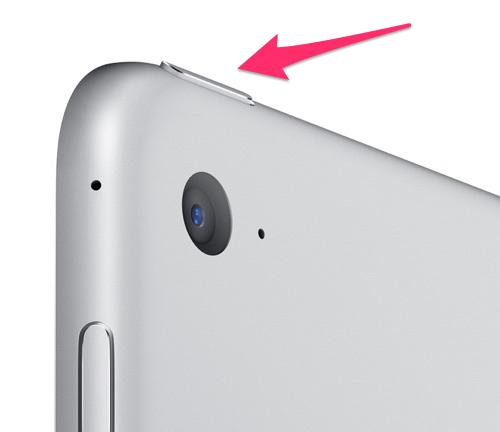
1. Power it up.Once you unwrap your iPad, and breathe in the wonderful scent of fresh electronics, the next thing you’ll want to do is to give your new best friend life. To do that, you’ll have to find the power button on the iPad’s top edge.

iPad power button


Hold the button down for a few seconds until the tablet’s screen lights up with the Apple logo. Don’t get too excited, though; we’ve still got a few more steps ahead of us before your iPad is ready to go.

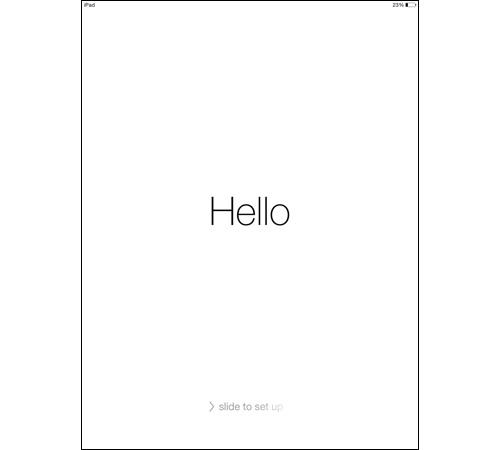
2. The setup.First things first: Let’s configure your iPad. When the onscreen Apple logo disappears, you’ll be greeted by a screen that says “Hello” in a variety of languages. Swipe from left to right, and we can get started.

iPad hello screen


On the next few pages, you’ll be asked to select your language and country. Next, you’ll want to select your Wi-Fi network.

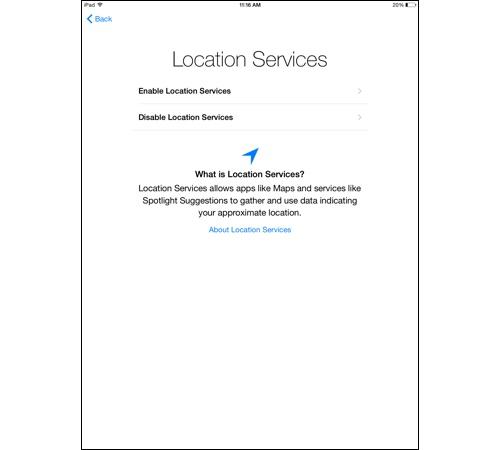
Up next, Location Services. If you’re going to be doing things like checking the weather in your area, or using Apple Maps, then Location Services is worth turning on. If not, keep it switched off, as it will put a serious drain on your iPad’s battery.

iPad location services setup screen


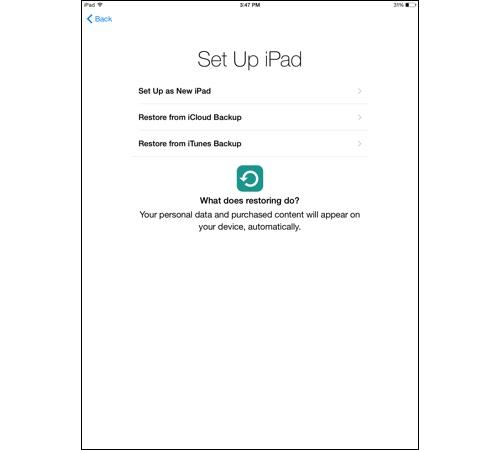
Next you’ll be asked if you want to set up your iPad as a new iPad, or if you want to restore it from an iCloud or iTunes backup. If this is your first iPad, then go with New iPad.

Set up iPad screen


If this is a replacement for an older iPad, then you can restore it with an iCloud or iTunes backup to automatically load all your previously purchased content and personal data onto your new iPad.

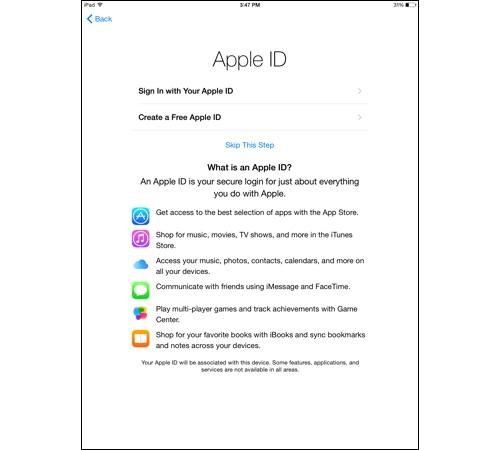
3. Using Apple ID.Let’s talk Apple ID. If you’ve used an Apple product before, chances are you already have one of these. It’s the username and password combination you use to purchase things from the iTunes and App stores. If you have one, just tap Sign In with Your Apple ID so you can use your existing account on your new iPad.

Apple ID setup screen


Don’t have an Apple ID? Then you’ll want to tap Create a Free Apple ID and follow the instructions on the following pages to make one.

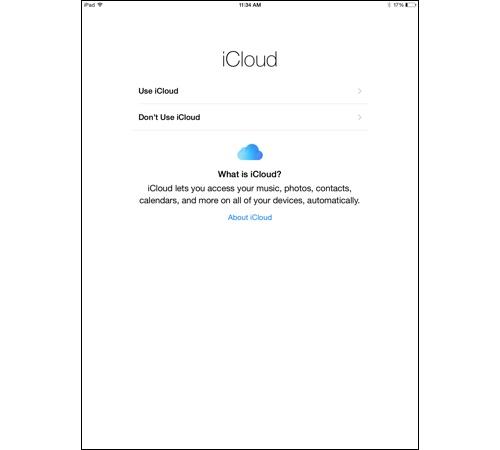
4. iCloud and Find My iPad.Next up, iCloud. Apple’s iCloud lets you save your photos, contacts, music, and other data to the cloud, so that it’s accessible on all your other Apple devices, as well as your Windows PC. Most people will want to enable this feature.

iCloud setup screen


When you enable iCloud, you also automatically turn on Apple’s Find My iPad feature, which can help you locate your tablet if you misplaced it or it’s stolen. If your iPad is pilfered, Find My iPad will also let you lock it and erase it remotely. You definitely want this turned on.

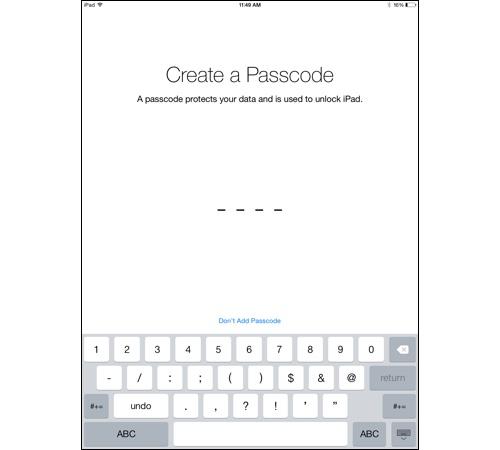
5. Securing your iPad.Passcode and Touch ID are up next. Both features provide you with a means to lock your iPad without anyone else getting in. Passcode is a simple four-digit code that you enter on the iPad’s lock screen to gain access to the slate.

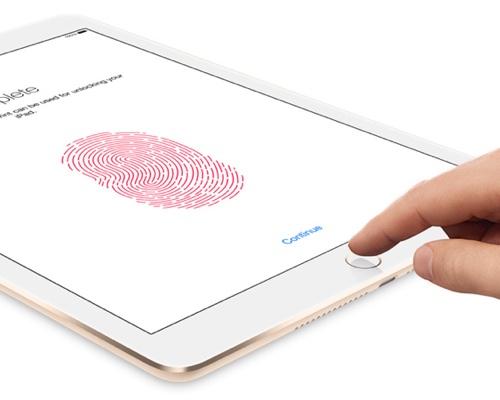
Touch ID setup on the iPad


Touch ID is the fingerprint reader built into the iPad Air 2 and iPad mini 3’s Home buttons. But Touch ID isn’t just about locking down your tablet. It can also be used to make secure online purchases.

If you got an Air 2 or mini 3, you’ll definitely want to set up Touch ID. To do so, you’ll have to press the finger you want to register on the Home button multiple times at a variety of angles until the iPad is able to easily read it.

Don’t have an Air 2 or mini 3? Then set up a passcode to secure your iPad.

iPad Create a Passcode screen


The next few pages will ask if you want to use Apple’s Siri voice assistant and if you want to send diagnostic information about the iPad to Apple and analytics to app developers to help them improve their apps. Make your selections, and you’re all set to use your new iPad.

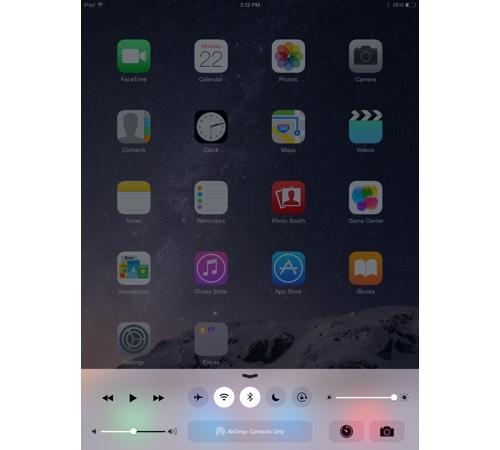
Some quick housekeepingOnce your iPad is ready to go, there are a few things you’ll want to know how to use. The first is the Control Center, which is accessible by swiping one finger up from the bottom of the screen toward the top.

From here, you can quickly toggle your iPad’s Bluetooth, Wi-Fi, Airplane mode, and Do Not Disturb mode. You can also adjust the screen brightness and volume, as well as control music playback and open the Camera app.

iPad home screen


If you’re worried about your iPad’s battery life, it’s important to remember that the brighter the screen, the more power it will use. What’s more, if you aren’t using Wi-Fi, Bluetooth, or Location settings, then it’s best to switch them off, as they will all leech your battery’s power. All of that can be accomplished from the Control Center.

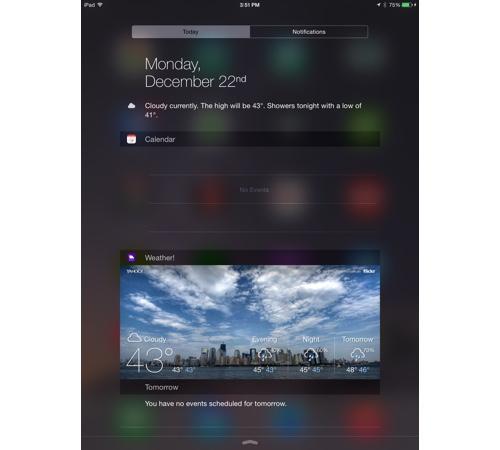
Beyond Control Center, you’ll also want to know how to use the Notifications Center. Accessible by swiping down from the top of the iPad’s home screen, Notifications Center is home to all your app notifications.

iPad Notification Center


From here you can see who’s been messaging you on Facebook and Twitter, as well as check the day’s schedule. And, with iOS 8, you can add app widgets to the Notifications Center that provide you with a snapshot of your favorite apps.

That’s about all you need to know to get started. Want to know more about your sweet new tablet? Check out our guide to iOS 8, and don’t forget to check out our favorite iPad apps for some suggestions on what to download.

Tuesday, 1 January 2013

The Cars Billionaires Drive

If you said all billionaires drive around in luxury cars, eat your words. While Mukesh Ambani’s Maybach 62 costs Rs 5.25 crore, Ikea founder Ingvard Kamprad has been driving a 1993 model Volvo 240 which is currently worth about $1500 (Rs. 83160)

According to the Forbes Billionaires List, Mexican telecom giant Carlos Slim Helu is the world's richest man. He drives a Bentley Continental Flying Spur which costs around 1,70,00,000 Indian rupees
Billionairesdrive

Reliance India Chairman Mukesh Ambani with a net worth of $22.3 billion is the world's richest Indian in the Forbes list. He drives one of the most luxurious cars, a Maybach 62 along with a Mercedes S Class and a Mercedes SL500. The Maybach is worth a whopping INR 5 crores.
Billionairesdrive

Industrialist Anil Ambani drives a car that suits his personality, a Lamborghini Gallardo. The Gallardo accelerates from 0 to 100 kmph in 4.1 seconds and on to a top speed of 325 km/h. Its V10 engine offers 500 hp and 376 lbs-ft of torque.
car

No, Ratan Tata doesn’t drive a Tata Nano. He uses a Mercedes S Class instead. His fleet also includes a Ferrari California, a Maserati Quattroporte, a Cadillac XLR and a Chrysler Sebring.
car

Liquor baron Vijay Mallya is famous for his passion for vintage cars. However, among his daily drivers is the pricey Maybach 62.
car

The miserly side of Facebook founder Mark Zuckerberg is no secret. He owns one of the cheapest cars, an Acura TSX. It costs about $30,000 (Rs 17 lakh)
Billionairesdrive

Microsoft founder Bill Gates’ daily drive is a Porsche 959 Coupe. Only 230 examples of this car were built and each one costs 2.2 crore Indian rupees.
Billionairesdrive

Another modest billionaire, Steve Ballmer, drives a hybrid Ford Fusion which is worth around 10 lakh Indian rupees.
Billionairesdrive

Financial data tycoon Michael Bloomberg drives an Audi R8 that’s worth more than a crore.
Billionairesdrive

Heiress of the Wal-Mart fortune, Alice Walton, is the second richest woman in the world. But she owns a simple car, a 2006 Ford F-150 King Ranch. It is worth Rs 22 lakh
Billionairesdrive

Prince Alwaleed Bin Talal Alsaud, the nephew of Saudi King Abdullah, certainly drives the royal car. However, his Rolls-Royce Phantom is an entry level version and costs around Rs 3.5 crores in India
Billionairesdrive

Warren Buffett drives a Cadillac DTS which, according to Business Insider, he bought to support the then failing General motors.
Billionairesdrive

Billionaire Michael Dell drives a cool 2004 Porsche Boxter.
Billionairesdrive

Google’s current executive Chairman Eric Emerson Schmidt loves the nature and drives a Toyota Prius, which is among the cleanest vehicles in the world
Billionairesdrive

French businessman and the chief executive officer of PPR François-Henri Pinault drives a Lexus LX SUV
Billionairesdrive

Ikea founder Ingvard Kamprad is worth an estimated $28 billion according to Forbes. However, he seems to be the humblest among the billionaires and has been driving a 1993 Volvo 240. According to Business Insider, if the car sold today, it would only be worth about $1500 (Rs. 83160)
Billionairesdrive

Oracle founder Larry Ellison has a huge collection of pricey cars but the most prestigious possession is a McLaren F1. Production of this car was stopped in 1998 and only 106 were produced. This car could accelerate from 0-100km/h in just 3.2 seconds. This car is currently worth $4.1 million.
Billionairesdrive

Apple founder Steve Jobs’ widow Laurene Powell Jobs drives around in a silver Audi A5.
Billionairesdrive

Phil Knight, co-founder and chairman of Nike, owns an Audi R8
Billionairesdrive

Sunday, 15 July 2012

First Apple computer fetches $374,000


A rare surviving first model of the Apple computer -- a stripped down, clunky device that bears no resemblance to today's sleek gadgets -- sold for $374,000 at auction in New York on June 15.


The Apple l, the first Apple computer made by Steve Jobs and Steve Wozniak in 1976, is seen on display at Sotheby's on June 8, 2012 in New York City. The computer was an integral component to the the personal computing revolution; it is set to be auctioned on June 15, 2012 and is expected to earn between $120,000 and $180,000. When originally sold, the monitor, keyboard and cassette interface were sold separately.
apple

The Apple l, the first Apple computer made by Steve Jobs and Steve Wozniak in 1976, is seen on display at Sotheby's on June 8, 2012 in New York City. The computer was an integral component to the the personal computing revolution; it is set to be auctioned on June 15, 2012 and is expected to earn between $120,000 and $180,000. When originally sold, the monitor, keyboard and cassette interface were sold separately. It is believed less than 50 of the original Apple l are still in existence, with only six known to be in working condition
apple

6, is seen on display at Sotheby's on June 8, 2012 in New York City. The computer was an integral component to the the personal computing revolution; it is set to be auctioned on June 15, 2012 and is expected to earn between $120,000 and $180,000. When originally sold, the monitor, keyboard and cassette interface were sold separately. It is believed less than 50 of the original Apple l are still in existence, with only six known to be in working condition
apple

The Apple l, the first Apple computer made by Steve Jobs and Steve Wozniak in 1976, is seen on display at Sotheby's on June 8, 2012 in New York City. The computer was an integral component to the the personal computing revolution; it is set to be auctioned on June 15, 2012 and is expected to earn between $120,000 and $180,000. When originally sold, the monitor, keyboard and cassette interface were sold separately. It is believed less than 50 of the original Apple l are still in existence, with only six known to be in working condition.
apple

Saturday, 7 July 2012

Man wears iPod with metal implants


Professional body piercer Dave Hurban is a man attached to his iPod. Literally. Hurban, 21, who works in a tattoo parlor in Newfield, N.J., implanted four metal studs in the skin of his wrist and secured his iPod to them magnetically


Tattoo artist Dave Hurban displays an iPod Nano which he has attached to his wrists through magnetic piercings in his wrist in New York

Tattoo artist Dave Hurban displays an iPod Nano which he has attached to his wrists through magnetic piercings in his wrist in New York

Tattoo artist Dave Hurban displays an iPod Nano which he has attached to his wrists through magnetic piercings in his wrist in New York, May 14, 2012. REUTERS/Keith Bedford 
Tattoo artist Dave Hurban displays an iPod Nano which he has attached to his wrists through magnetic piercings in his wrist in New York

Tattoo artist Dave Hurban displays an iPod Nano which he has attached to his wrists through magnetic piercings in his wrist in New York

Tattoo artist Dave Hurban displays an iPod Nano which he has attached to his wrists through magnetic piercings in his wrist in New York, 
Tattoo artist Dave Hurban displays an iPod Nano which he has attached to his wrists through magnetic piercings in his wrist in New York

Tattoo artist Dave Hurban displays an iPod Nano which he has attached to his wrists through magnetic piercings in his wrist in New York

Tuesday, 8 May 2012

Orangutans master ipads


Workers at Jungle Island in Miami are using iPads to better communicate with their orangutans.


In this April 4, 2012 photo, Linda Jacobs touches an orangutan at Jungle Island in Miami. Experts who work with primates have been using sign language and other methods to communicate with apes for years. But with advancements in tablet computer technology, workers at Jungle Island in Miami are using iPads to better communicate with their orangutans
In this April 4, 2012 photo, Linda Jacobs touches an orangutan at Jungle Island in Miami.  Experts who work with primates have been using sign language and other methods to communicate with apes for y

In this Feb. 21, 2012 photo, an orangutan works with an IPAD at Jungle Island in Miami. Experts who work with primates have been using sign language and other methods to communicate with apes for years. But with advancements in tablet computer technology, workers at Jungle Island in Miami are using iPads to better communicate with their orangutans
In this Feb. 21, 2012 photo, an orangutan works with an IPAD at Jungle Island in Miami.  Experts who work with primates have been using sign language and other methods to communicate with apes for yea

In this April 4, 2012 photo, Linda Jacobs uses an IPAD as she works with an orangutan at Jungle Island in Miami. With advancements in tablet computer technology, workers at Jungle Island in Miami are using iPads to better communicate with their orangutans. Jacobs, who oversees the program, says orangutans are extremely intelligent but limited by their physical inability to talk
In this April 4, 2012 photo, Linda Jacobs uses an IPAD as she works with an orangutan at Jungle Island in Miami. With advancements in tablet computer technology, workers at Jungle Island in Miami are

n this Feb. 21, 2012 photo, after being told a word, an orangutan points to that object on an IPAd at Jungle Island in Miami. Experts who work with primates have been using sign language and other methods to communicate with apes for years. But with advancements in tablet computer technology, workers at Jungle Island in Miami are using iPads to better communicate with their orangutans
In this Feb. 21, 2012 photo, after being told a word, an orangutan points to that object on an IPAd at Jungle Island in Miami. Experts who work with primates have been using sign language and other me